
Toll card management: every pass checked against the loads
A month of toll-card passes is hundreds of lines nobody has time to read. Grillo Fleet Management Software checks each one against the load register, shows Operations only the passes that don't add up, and charges the rest to the loads they were for.
Import the bank's monthly file
Download the toll transactions by transaction date from FNB Fleet and import the file as it is. Each pass is read with its plaza, time, direction and vehicle class. Importing the same file again adds nothing, and a later file only adds the lines that are new.
The bank captures passes days or weeks late, so the newest three weeks are marked provisional until they have had time to arrive.
Every pass checked against the loads
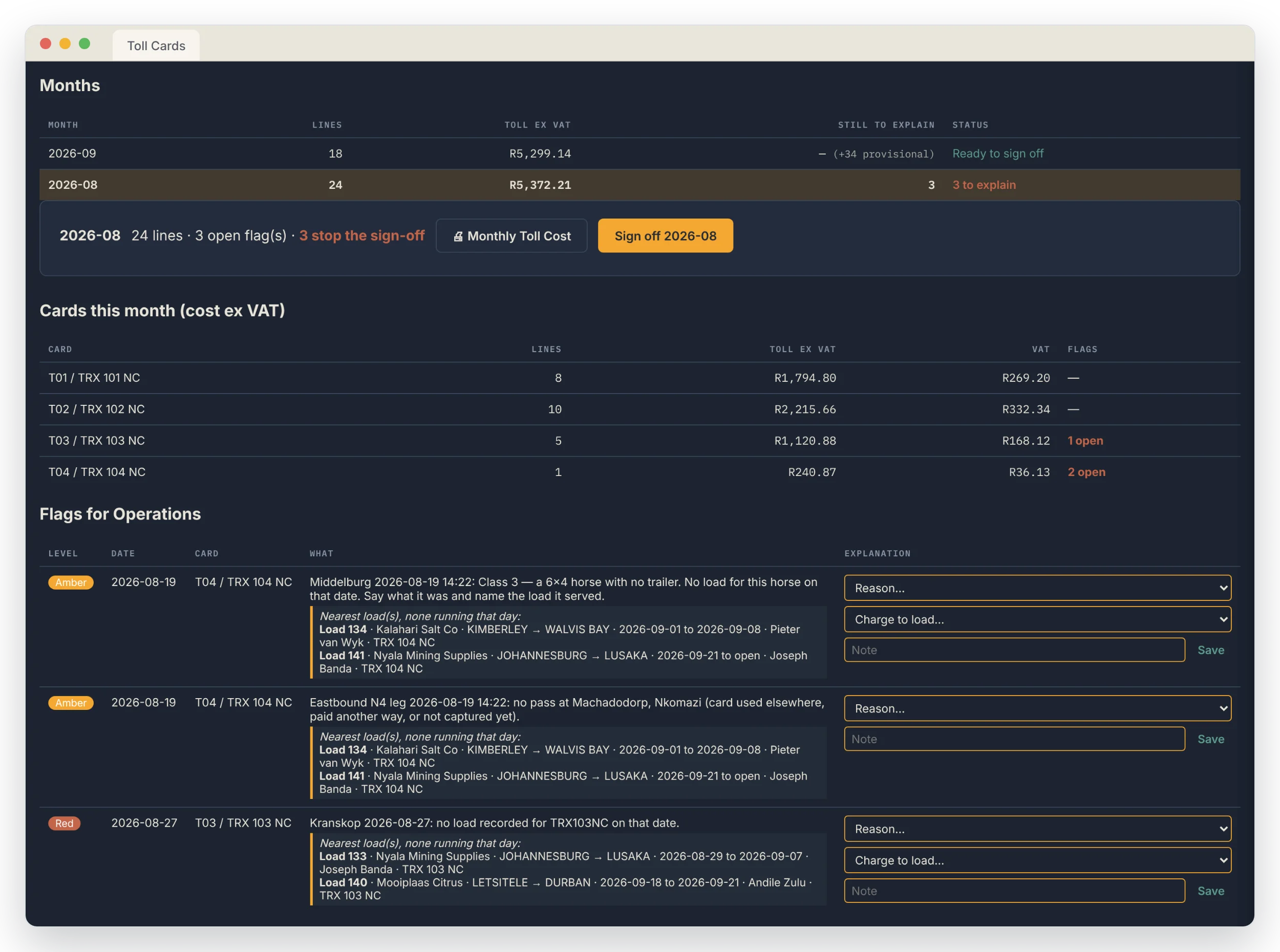
Each pass is matched to a load of the truck carrying the card that day. A pass on a day the truck had no load, a horse travelling without its trailer, two passes on different roads too close together for one truck, a charge that isn't the plaza's tariff, or VAT that doesn't add up is flagged for Operations.
Each load records the toll roads it uses, suggested from the last load on the same route. A plaza on the route with no pass, a pass on a road the load doesn't use, and a route changed after the passes were imported are flagged too. Each flag shows the load it is about, with its dates, driver and truck.
Explained, then signed off each month
Operations answer each flag with a reason, such as a card used on another truck or a horse moved without a trailer, and can name the load a pass belongs to. A month can only be signed off once every flag outside the provisional weeks is explained. If a later import adds lines to a signed-off month, it shows as changed and needs signing off again.
Tolls on each load's profit
Every pass is charged to its load ex VAT, without waiting for the month's sign-off, and appears in a Tolls column on the Trip Profitability report, the Profitability Summary and the Unbilled Loads report. The card fees and interest on the bank statement are spread over the month's passes, so the loads carry those too.
Passes that match no load are shown as toll on no load, and the Monthly Toll Cost report breaks each card down into what was charged to loads, what was on no load and the fees.
Which truck has which card
The Toll Card Admin screen shows which truck carried each card on any date. When a card moves to another truck, the hand-over is recorded with a reason and goes on the administrator's exception report, and replacement cards are recorded the same way.
When a load is despatched with a horse that has no card, the app asks which card went with it and records the answer. A register of toll plazas holds each one's road and tariff.
Common questions
Which bank's toll file does it read?
The FNB Fleet toll transactions export, by transaction date (menu Standard, Financial, Toll). The statement and the other export are by the date the bank captured each line and can't be matched to loads.
Do passes wait for the month to be signed off before they're costed?
No. A pass that matches a load is charged to it straight away. Explanations are needed to sign the month off, not to cost the loads.
Are tolls costed with VAT?
No. Each pass is charged to its load ex VAT. The card fees are entered ex VAT and the interest carries none.
What if one card was used on two trucks?
Record the hand-over on the Toll Card Admin screen from the date it moved. Passes after that date are matched to the other truck's loads, and the move is on the exception report.
See it on your own routes and rates
Every deployment gets its own branding, its own database and its own data. Book a demo and we'll show you it running on sample data.