
Fleet compliance software for permits, CoF and driver certificates
An expired fire permit or PrDP found at the border costs far more than the renewal. Grillo Fleet Management Software keeps every expiry in one list and catches an expired document when a tanker or cross-border load is captured.
Every document type you need, with its own renewal cycle
Set up the vehicle documents your fleet needs, such as a certificate of fitness, fire permit or cross-border road permit, each with its validity period and how many days' warning you want. Driver certificates such as a PrDP, medical certificate or dangerous-goods training work the same way, and so do subcontractors' documents.
Each renewal can carry its reference number, like a permit or licence number, so the document on file can be found without a filing cabinet.
Warned before the load leaves
When a tanker is put on a load, the horse and tanker are checked for the permits you've marked as required, such as a fire permit, and the driver for the certificates you've marked, such as dangerous-goods training. Permits tied to a country, like a Zimbabwe road permit, are checked when that country is the destination.
Anything expiring soon is shown as a warning. Anything expired or never recorded can only be saved with a typed reason, one for each document, so the fire permit and the driver's dangerous-goods certificate each get their own explanation.
Permits that don't apply on a route
Some permits only matter on some routes, such as a KZN fire permit on a run that never enters KZN. The administrator can switch a permit off for one route, in one or both directions, with a reason. Everyone else sees "Not required on this route" on the trip but can't add or change route exemptions, and changing a load's route onto an exempt one is itself recorded.
Every override on record
Each time someone pushes past a check, the system records who, when, which load, vehicle or driver, and the reason they gave. That covers saving a load with an expired permit or certificate, dismissing a compliance alert, editing or deleting a renewal record, and changing odometer readings.
Only the administrator can see the Exception Report. It can be filtered and printed, entries can't be edited or deleted, and a daily email summarises anything new.
One list of what's due
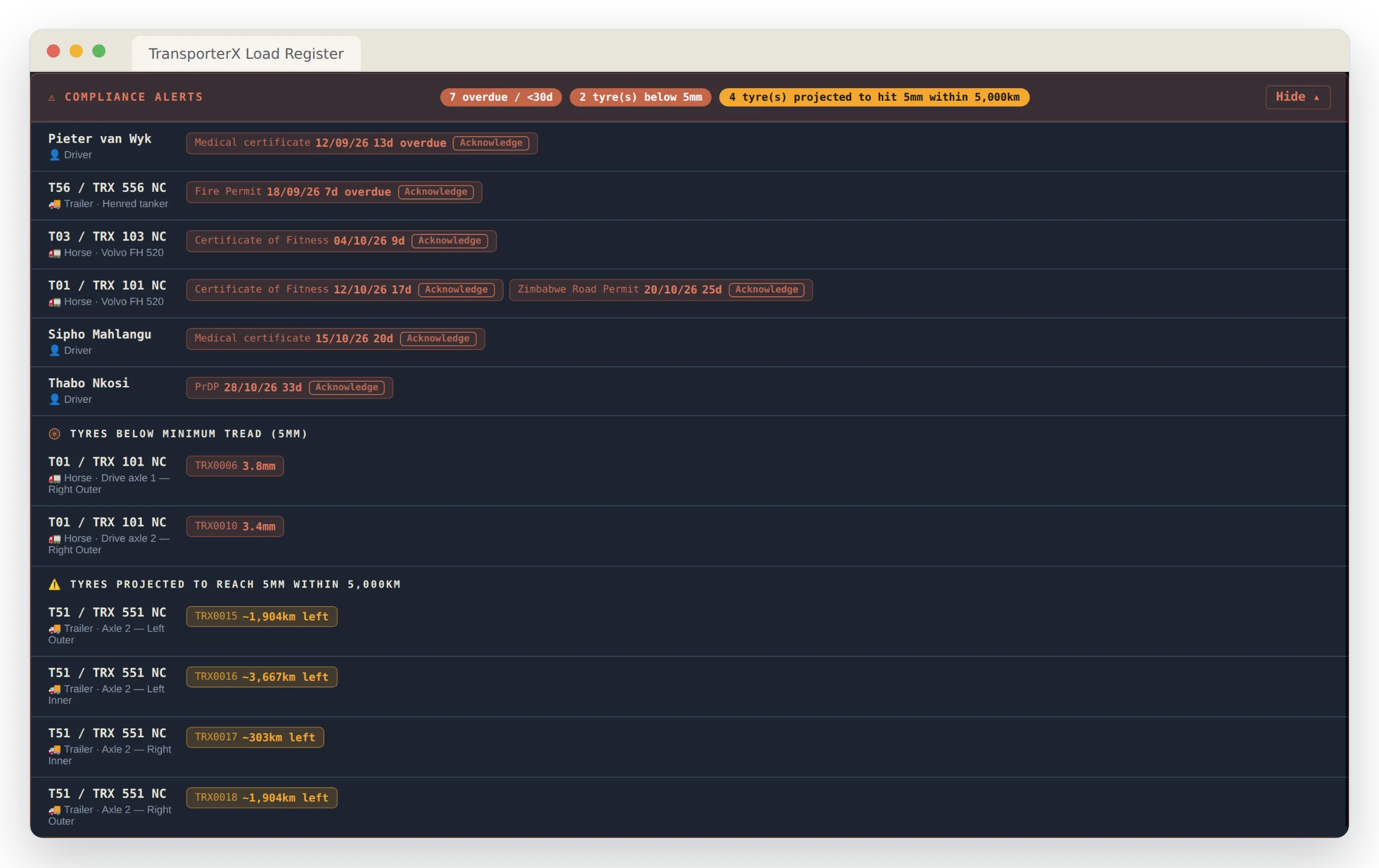
The Compliance Alerts panel on the dashboard lists everything overdue or coming due, with the number of days left on each, together with tyres below minimum tread or wearing towards it. Click a count, such as the tyres, to see just those. A gap that genuinely doesn't apply can be acknowledged, with a reason, so it stops nagging.
Common questions
Can we add our own document types?
Yes. Any vehicle, driver or subcontractor document type, each with its own validity period and warning window.
Does it stop a load being captured?
An urgent load can still be captured with an expired or missing document, but only with a typed reason for each one, and every override goes on the administrator's exception report. A truck with a tyre below the despatch minimum can't be put on a load at all.
Who sees the exception report?
Only the administrator you nominate. Other users can't open it, and nobody can edit or delete an entry.
Can it track documents by country?
Yes. A permit type can be tied to a country and is only checked for trips going there.
See it on your own routes and rates
Every deployment gets its own branding, its own database and its own data. Get in touch and we'll set yours up.