
Trip costing and profitability software for trucking
Know what each load really cost and what it made, as soon as the trip closes, instead of at month-end. Every rand spent is tagged to the load it belongs to, from the first requisition to the final reconciliation.
Every cost on the trip it belongs to
Diesel orders, cash advances, border fees, tolls, maintenance and permit renewals are raised as cheque requisitions against the trip. One supplier invoice covering several loads or trucks is split line by line, each line allocated to its own trip or fleet number.
Night-out and day-rate accruals for the driver count as staff costs on the same trip.
Driver salary carried by the loads
Enter each permanent driver's monthly cost to company once, with the date it takes effect, and it is shared across the loads the driver was away on, by calendar day, into Staff Costs. Days on a linked run are shared by shipment, and a gap between two legs of one run belongs to the run. A load's margin then carries its real people cost.
Whole-fleet reports add a line for unabsorbed driver salary, the days on no load, and a Monthly Driver Cost report covers every driver, permanent and temporary. Salary figures can be hidden login by login.
Planned against actual at close-out
When the driver is back, close-out works through the paperwork one pile at a time: diesel receipts with litres, cash advances and slips, then supplier invoices. Each line shows what was planned next to what was actually paid.
A run of linked loads is closed leg by leg, with each close-out showing the cash and diesel already captured on the other legs. It warns about a duplicated diesel slip or cash on the wrong leg, and a leg left open needs a reason.
Diesel ordered without a price, such as a fill-up, is kept out of the planned-versus-actual variance and checked on litres instead. Litres captured at close-out give the truck's fuel consumption in km per litre.
Profit per load, with nothing hidden
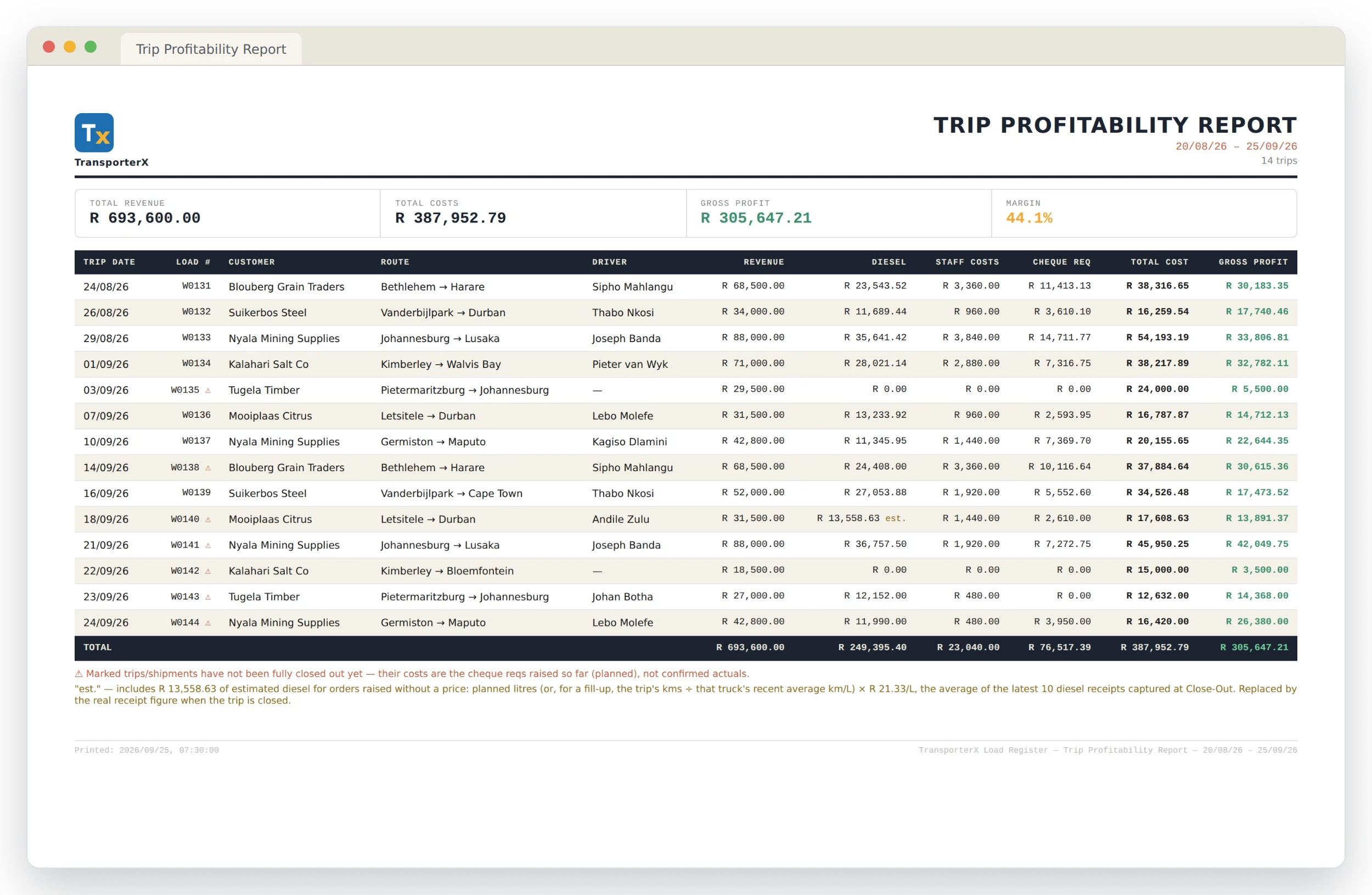
The Trip Profitability report shows revenue, diesel, staff costs, requisitions and gross profit for every load in a period, filtered by customer, route, own fleet or subcontracted. Trips not yet closed are marked, and diesel ordered without a price is estimated from the truck's own recent consumption instead of counting as nothing.
A Profitability Summary rolls the same figures up by customer or route, and an Unbilled Loads report shows what has already been spent on loads that haven't been invoiced yet.
Odometer readings you can trust
Kilometres drive consumption, cost per km and driver pay, so a mistyped reading costs money. Each truck's readings form one chain: only the closing is typed from the trip sheet, and the next trip's opening follows on from it automatically. A trip waiting for an earlier one to be closed shows a blank opening until it is, and linked loads count as one run with the km for the whole run.
Shunting and workshop runs are recorded as non-trip movements, so every kilometre is accounted for. If a truck breaks down mid-trip, the replacement horse takes over the load as a second leg, with its own readings, diesel and driver. The Odometer Check lists any reading that doesn't follow on, and the Horse Mileage report prints one truck's readings trip by trip.
Maintenance cost per km
The Vehicle Maintenance Cost report shows monthly maintenance spend per vehicle, or cost per km for each horse over the km from its closed-out trips. Trailer maintenance is shared across the horses that pulled the trailer.
Subcontracted loads costed the same way
Costs you finance on a subcontractor's behalf net off their invoice automatically, so the amount still owed is calculated, not re-typed. Their margin shows next to your own fleet's.
Common questions
How is diesel costed on a trip that isn't closed yet?
If the order has a price, that's used. A fill-up ordered without a price is estimated from the truck's recent km per litre and the latest price per litre captured, and marked as an estimate until the receipt replaces it.
Can one invoice be split across trucks and loads?
Yes. Each line of an ad hoc requisition is allocated to its own trip or fleet number.
Does it replace our accounting system?
No. It's where each trip's costs are captured and reconciled; reports such as the Vehicle Maintenance Cost report are laid out to be captured into your books once.
What stops someone changing an odometer reading?
Only the closing is typed, and the opening comes from the previous trip. Changing a saved reading, accepting an implausible distance or marking the odometer as not working needs a typed reason, and each one goes on the administrator's exception report.
See it on your own routes and rates
Every deployment gets its own branding, its own database and its own data. Get in touch and we'll set yours up.